Headless API reroller · Global only
Reroll Umamusume with the game closed.
Fortuna signs in to Steam itself, mints each account through the game's own API, spends every carat on the banner you picked and keeps the full pull history.
Windows 10 / 11 · one exe · nothing to install
One account, start to finish
No window, no plugin, no OCR.
Fortuna never launches the game. It opens its own game session and talks to the servers over the same API the client uses. The only thing it reads from your install is the game's data file, master.mdb, for card names, banners and odds.
- 1Clear the Steam slot
- 2Mint a new account
- 3Claim login and present gifts
- 4Spend every carat on your banner
- 5Publish a transfer password
- 6Claim missions, pull again
- 7Record everything
- 8Repeat
Each account takes about 1 to 1.5 minutes. A full 100-account run takes roughly 2.4 hours, and every step is narrated in the live log.
The difference
Why it isn't a macro.
Most rerollers drive the game: they open a window, tap through menus and read the screen. That is slow and breaks on any screen they don't expect.
| Typical macro rerollers | Fortuna | |
|---|---|---|
| Opens the game to reroll | Every account | Never |
| Reads the screen with OCR | Yes | Direct API |
| Needs a plugin or memory patch | Yes | None |
| Spends carats on your banner | Sometimes | Spend-all, every time |
| Keeps a recoverable account | Rarely | Every reroll |
| Pull history and SSR ledger | No | Local database and Excel export |
| Speed | Menu-tapping slow | About 1 account per minute |
Features
Everything a run needs, in one exe.
Pulls on the banner you chose
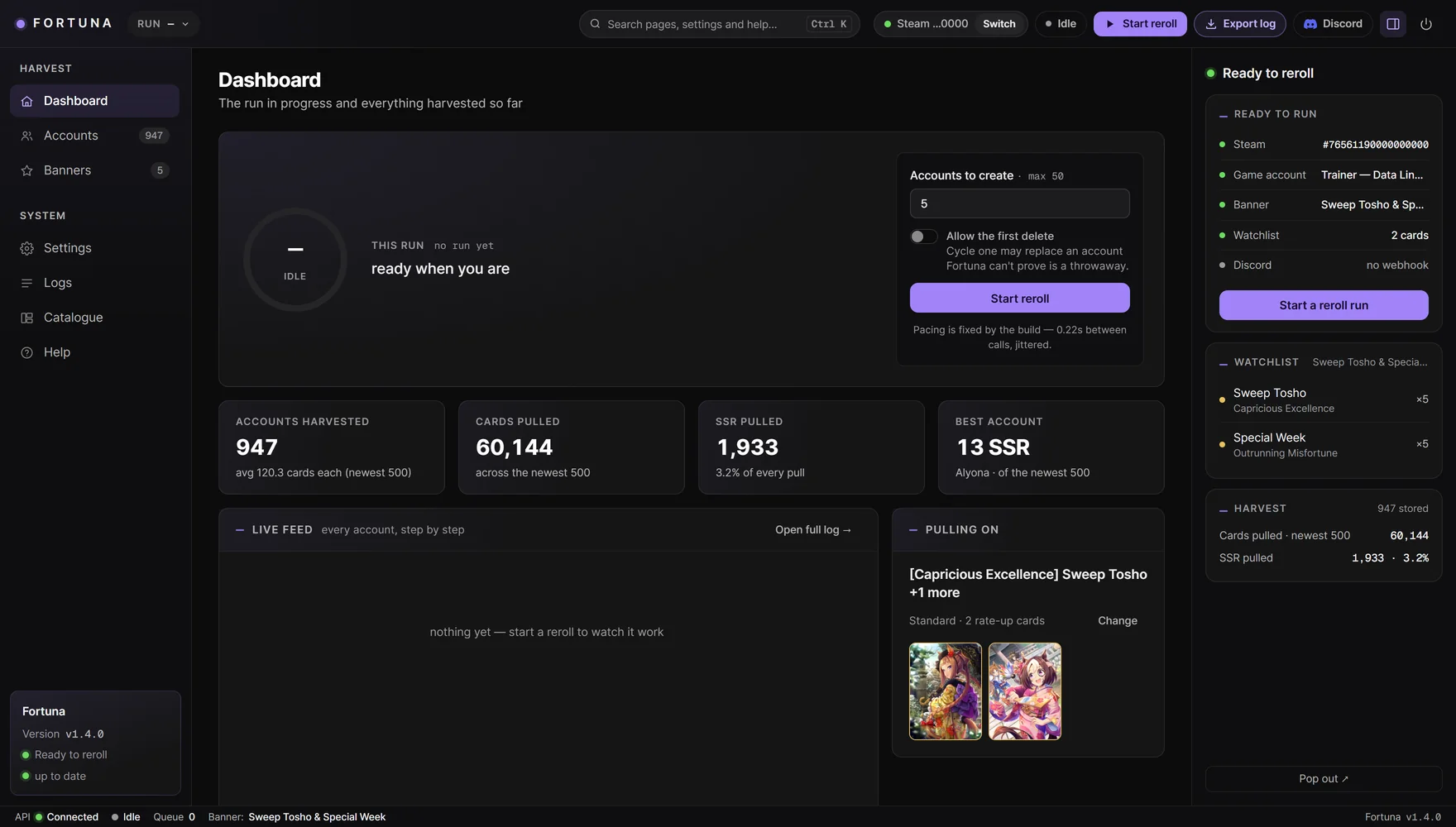
Free pulls first, then 10-pulls, then singles until the carats are gone. When they run out, Fortuna claims missions and presents and goes back to the same banner for up to two more rounds.
Gifted tickets used too
A switch pulls the 5 gifted SSR support tickets, and the trainee voucher goes on the uma you pick under Settings.
Every account recoverable
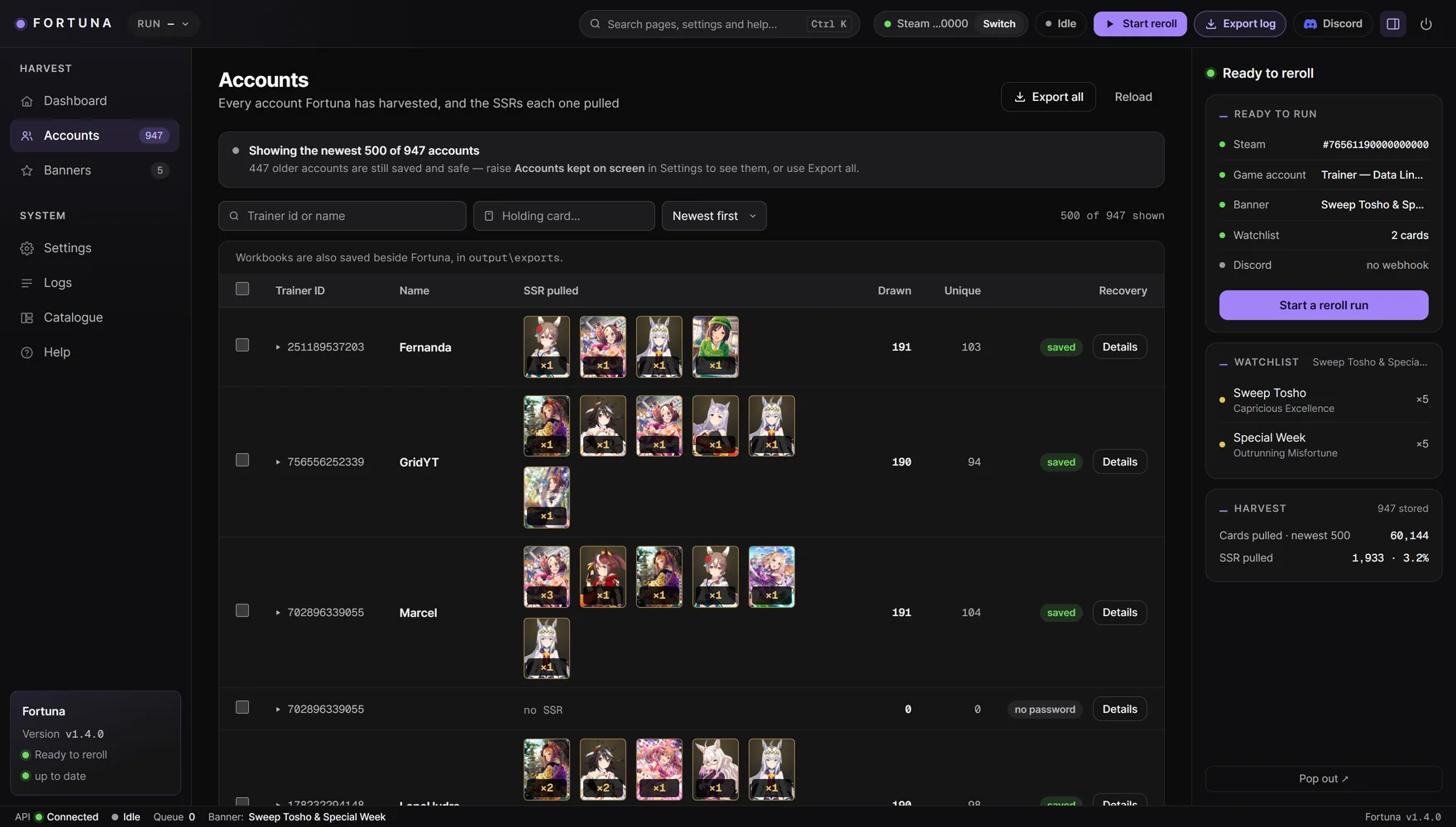
Each account gets a Trainer ID and a published Data Link password, so you can claim any roll you like in game later.
A watchlist that fills itself
Pick a banner and its SSRs go on the watchlist. Change any number, or add any character or support card.
Discord alerts
A hit posts the matched card, the account's pulls and its Trainer ID, on your own webhook. The transfer password is never sent.
Your harvest, organised
Search by trainer or by card held, sort by most SSR, and export a real .xlsx of accounts and cards.
A live dashboard
A verdict on Steam, account, banner, watchlist and Discord before you start, then the account in flight and the time left. The log reads in plain English.
Waits instead of burning accounts
When the game refuses a connection, Fortuna waits and retries the same slot. An hourly limit you set can pause a run before that happens.
Keeps up with game patches
Fortuna reads the game version from your install, tries the next one by itself when the server reports a patch, and finds the newest master.mdb.
Screens
Have a look around.
Quick start
Running in five steps.
- Download and unzip anywhere. On the first start, Fortuna unpacks what it needs into folders beside the exe. Leave them there.
- Run
Fortuna.exe. It opens the dashboard in your browser. - Sign in to Steam with the account that owns the game, typing a Steam Guard code if Steam asks.
- Protect the account already on that Steam. Set a Data Link password or mark it disposable.
- Pick a banner, set how many accounts, and press Start reroll. Watch them land under Accounts.
You need
- Windows 10 or 11.
- Umamusume: Pretty Derby (Global) from Steam, launched at least once.
- A Steam account that owns the game.
Coming from 1.3.x?
Your settings and harvested accounts carry straight over. The data folder is backed up first.
Safety and privacy
Know what you're running.
Use it at your own risk
Rerolling is against the game's terms of service. Accounts created this way can be banned.
Your main account is guarded
Fortuna refuses to delete an account it can't prove is disposable: one it created, one whose password it holds, or one you marked.
Your Steam password isn't stored
It goes only to Steam. The login token Steam returns is sealed with Windows DPAPI for your user.
Your data stays on your PC
Everything lives in one folder under AppData\LocalLow\Icarus\Fortuna. There is no telemetry, and the dashboard runs on 127.0.0.1.
Fixed pacing
Every delay is randomised, and there is no speed setting to turn down. Stop finishes the account in flight, so it keeps its password. A run holds up to 100 accounts, and no setting can raise that.
Limited outbound traffic
Fortuna talks to Steam, the game's servers, your own Discord webhook and this website for updates. Nothing else.
Spreadsheets hold passwords
Exports contain transfer passwords, so treat them with care. Back up the data folder to keep your harvest.
The Icarus Suite
Part of a family of tools.
- UmamusumeX
- Play the Global or Japanese client fully offline, with time travel, past events and career editing.
- Icarus
- A fully headless career bot with a live dashboard for decks, parents and race schedules.
- Sundial
- A multi-account manager that runs every Umamusume account you own from one dashboard. Set each account up once, then leave it.
- Overseer
- A companion overlay with live translation in 25+ languages, career tracking and race prediction.
- Un-Follower
- Finds inactive trainers and one-way follows, and unfollows them through the game's own API.
- Club Manager
- Tracks clubs and posts a leaderboard to Discord on its own schedule.
- Navigator
- The research rig that captures and replays the game's wire protocol.
Latest release
Fortuna 1.4.1
One exe for Windows 10 and 11. Unzip it anywhere and run it. There is nothing to install and no administrator rights needed.
Signed releases
Every release carries a manifest signed with Fortuna's key. The updater refuses anything that doesn't match it.
Updates itself
From 1.4.1, Fortuna updates from this site and keeps your accounts and settings. On 1.4.0, download the new version here once.
First start
SmartScreen may warn, because the exe has no publisher certificate yet. Choose More info, then Run anyway.
01d6ae0d3917aa5ef6d170413397aed9fde7a89116fc2a68735015c661512ef3